What’s new?
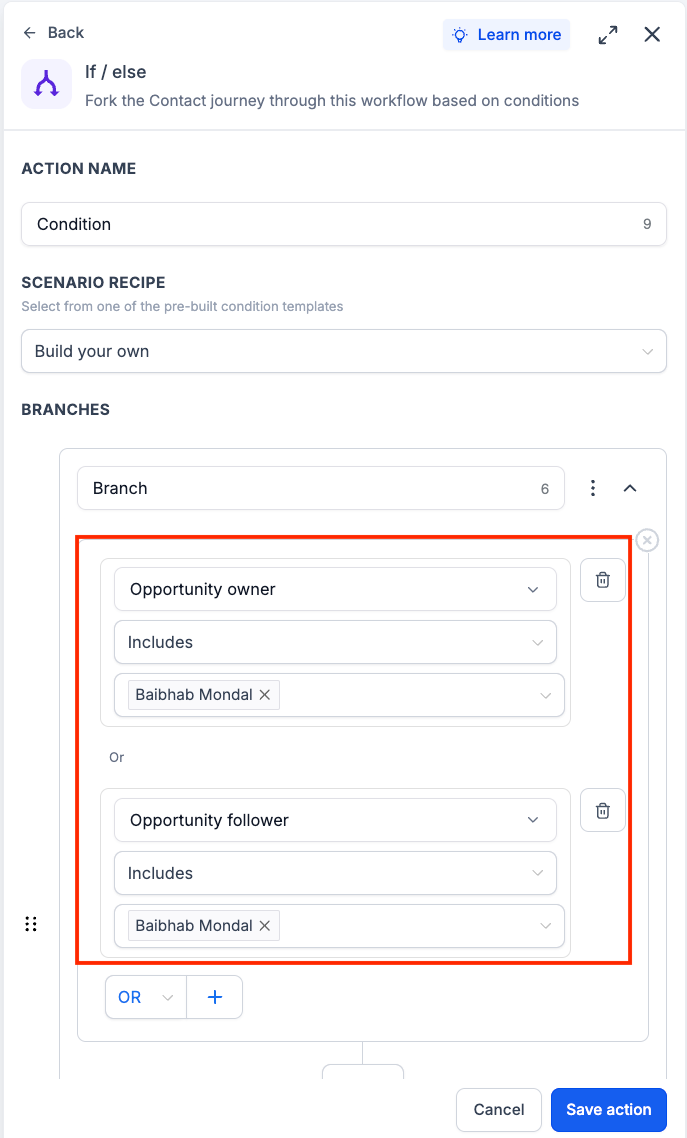
You can now use Opportunity Owners and Opportunity Followers as conditions in If/Else workflow branches. This enhancement lets you route contacts based on whether an opportunity has assigned owners or followers, removing a previous limitation where these fields were not available for branching logic.
How it works
When an If/Else step evaluates an opportunity, it can now check the Opportunity Owners and Opportunity Followers fields. The workflow will route contacts down the appropriate branch based on the condition you configure.
How to use it
Add or edit an If/Else action in your workflow.
Select Opportunity Owners or Opportunity Followers as the condition field.
Configure your condition and save the workflow.
Why we built it
Customers often assign owners and followers to opportunities as part of their sales and account management processes. Until now, workflows could not branch based on these assignments. This update makes it easier to automate routing, notifications, and follow-up actions using opportunity ownership data.
Simple use case example
Route opportunities to a dedicated follow-up sequence when an Opportunity Owner has been assigned.
Additional notes
Available in If/Else workflow conditions.
Supports both Opportunity Owners and Opportunity Followers fields.
Conditions are evaluated using the owners and followers currently assigned to the opportunity at the time the workflow reaches the If/Else step.
Existing workflows are unaffected unless these new conditions are explicitly configured.
Preview
Was this article helpful?
That’s Great!
Thank you for your feedback
Sorry! We couldn't be helpful
Thank you for your feedback
Feedback sent
We appreciate your effort and will try to fix the article